Why I Wrote This Guide
In March 2026, I did some SEO checks on my blogs. One of the recommendations was to take the FAQ posts I created and add FAQ schema. So I did research and, after looking at a few SEO tools, decided to create an app to help me build FAQ schema from my posts. It worked great, so I did more research on FAQ schema and added this to help others who want to add this feature to their blogs.

In May 2026, I was checking my blog on the Google Search Console and saw that the use of FAQ schema is being deprecated. That was a bit of a surprise and frustrating after doing a lot of research and building the app. So I did more research and found out that maybe this change didn't mean I wasted my time.
I compiled my research and created this post, which includes what I found. Bottom line: because I believe my content is useful and I created it to help my readers, I'm keeping FAQ schema on my posts.
Who This Is For
- WordPress bloggers
- Small business site owners
- SEO beginners
- Creators using Yoast, Rank Math, Divi, Elementor, or Gutenberg
What's In This Guide
- What FAQ schema is
- What Google deprecated in 2026
- What FAQ schema still does
- How to add FAQ schema to WordPress
- How to write good FAQ questions
- Common mistakes
- FAQ schema and AI search
- Whether you should still use FAQ schema
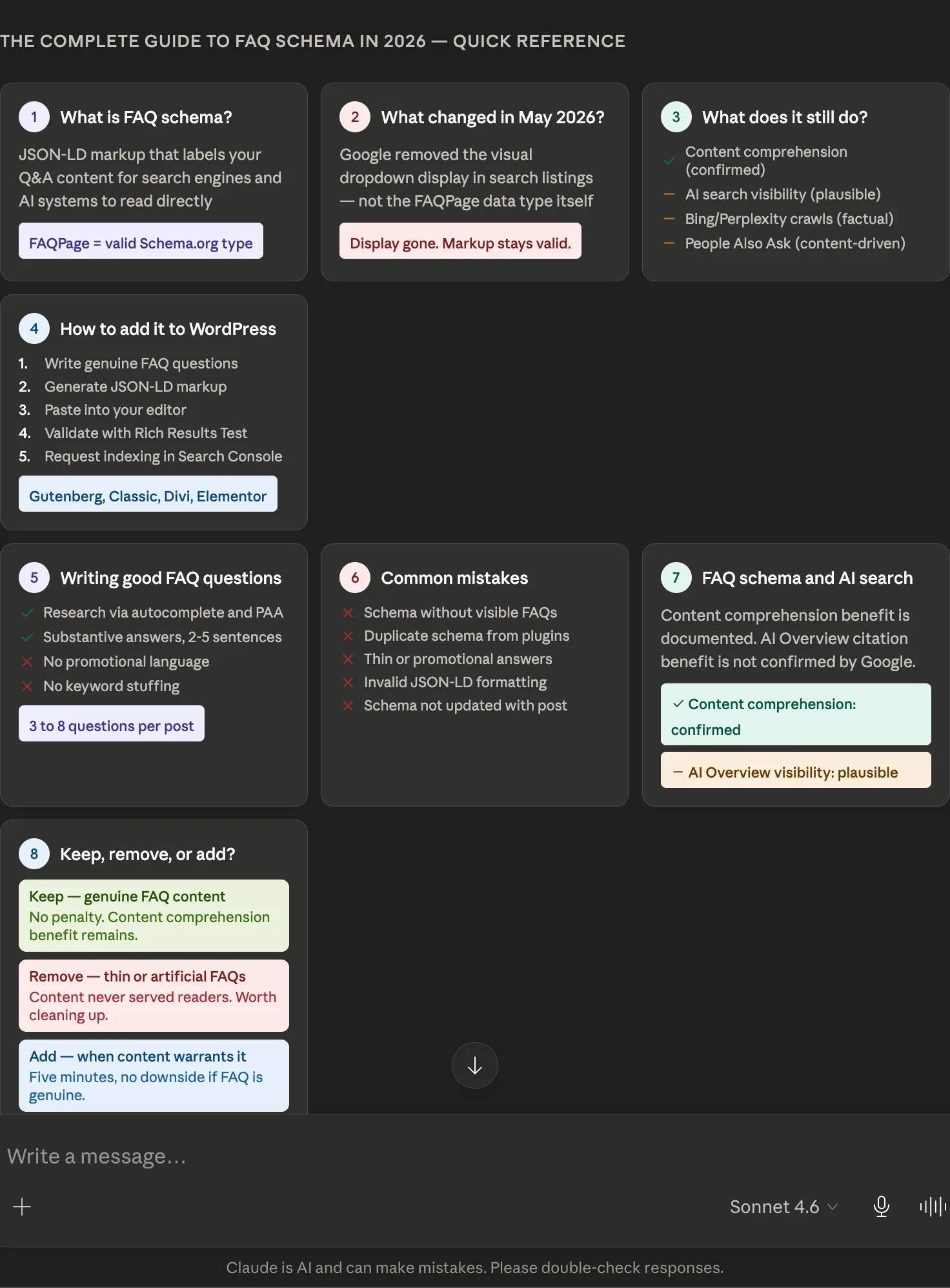
Here's What I Found for May 2026 and Beyond
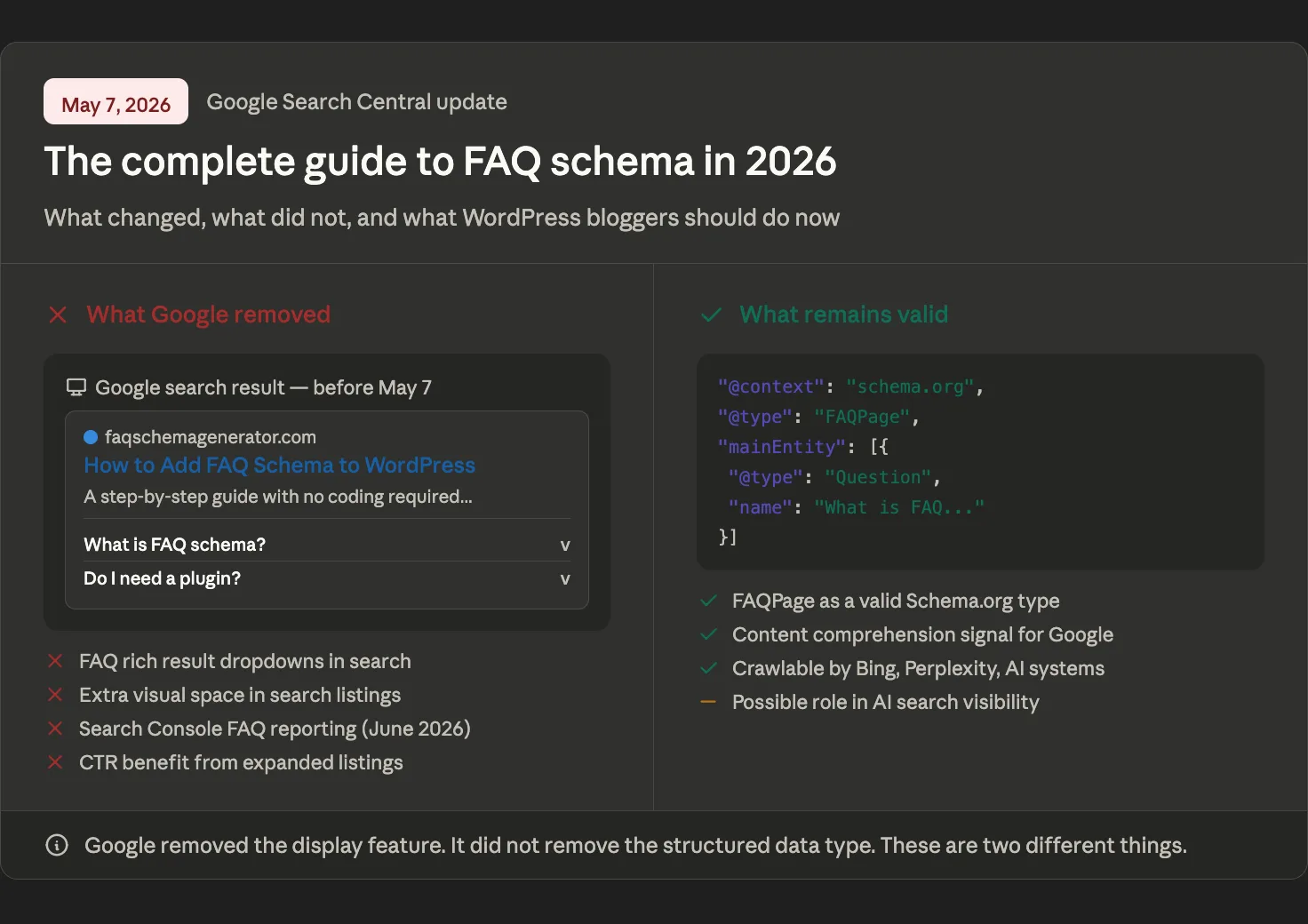
If you've been using FAQ schema on your WordPress site, you've probably seen the news: Google deprecated FAQ rich results on May 7, 2026. You can check out the details here: Google Search Central FAQPage Documentation.
The expandable question-and-answer drop-downs that used to appear in search listings are gone.
If you haven't been using FAQ schema yet, you may be wondering whether there's any point in starting.
This guide answers both questions honestly. It covers what FAQ schema is, what the May 2026 deprecation actually changed, what value the markup still delivers, how to implement it correctly, and how to decide what to do with your existing posts. Everything here reflects the current state of structured data in 2026, not the promotional framing that was written when rich results were still the primary payoff.
One thing up front: FAQ schema is not dead. The display feature is gone. The structured data type is not. Those are two different things, and the difference matters for every practical decision covered in this guide.
Part 1: What Is FAQ Schema?
FAQ schema is a type of structured data markup that labels your WordPress content in a format search engines and AI systems can read directly. Instead of Google inferring that your page contains a list of questions and answers, FAQ schema tells it explicitly: this page is an FAQPage, and here are the specific questions and answers it contains.
The code itself is invisible to your readers. It lives in the background of your page's HTML as a JSON-LD block — JavaScript Object Notation for Linked Data, Google's preferred format for structured data — and communicates only with search engine crawlers. Your post looks identical to visitors. To Google, Bing, Perplexity, and other AI search systems, it carries a precise structural label about your FAQ content.
FAQPage is one of hundreds of content types defined by Schema.org, the collaborative vocabulary project created by Google, Microsoft, Yahoo, and Yandex in 2011. Schema.org FAQPage defines the types of content that exist and the properties that describe them. FAQPage remains a valid Schema.org type. It was not deprecated in May 2026. What was deprecated was the Google search feature that used FAQPage markup to display expandable drop-downs in search listings. That distinction is covered in full in the next section.
For a deeper explanation of what structured data is and why it matters beyond just FAQ schema, see our full guide: What Is Structured Data and Why Does Every WordPress Blogger Need It?
Part 2: The May 2026 Deprecation: What Actually Changed
The SEO industry produced two overcorrected reactions to Google's May 2026 announcement. Some declared FAQ schema entirely dead and advised removing it everywhere immediately. Others claimed it now matters more than ever for AI search and advised doubling down. Neither reaction is accurate. Here is what Google actually did and did not do.
What Google Removed
Google deprecated the FAQ rich result display feature. This was the visual enhancement that showed expandable question-and-answer drop-downs beneath individual search listings, giving pages additional space in search results and allowing users to expand questions without clicking through to the page.
This feature had already been significantly restricted. In August 2023, Google limited FAQ rich results to well-known authoritative government and health websites. For the vast majority of the web, FAQ rich results had effectively been gone for nearly three years before the May 2026 announcement completed the deprecation for everyone.
The full timeline of what gets removed when:
- August 2023: FAQ rich results restricted to government and health sites for most queries.
- May 7, 2026: FAQ rich results stop appearing in Google search results for all sites.
- June 2026: FAQ search appearance filter, rich result report, and Rich Results Test FAQ check were removed from Search Console.
- August 2026: FAQ rich result data removed from the Search Console API.
What Google Did Not Remove
FAQPage as a Schema.org structured data type was not deprecated. Google stated that FAQ structured data may still be used to help understand page content, even though the FAQ rich result display has been removed. Google has not recommended removing valid FAQPage markup from pages containing genuine FAQ content, and there is no penalty for keeping it in place.
This is the core distinction that most coverage of this change missed. Google removed a display feature. It did not remove a content type. The markup that labels your FAQ content for machine reading continues to serve purposes beyond that one display feature.
For a detailed breakdown of everything the deprecation means for WordPress bloggers, see: Does FAQ Schema Still Work in 2026?
Part 3: What FAQ Schema Still Does in 2026
With the rich result display gone, the value of FAQ schema has narrowed and shifted rather than disappeared. Here are the four remaining benefits, with appropriate notes on what is confirmed versus what is plausible.
Content Comprehension
Google has indicated that structured data can still help it understand page content, even when a specific rich result feature is retired. FAQPage markup may affect how accurately Google interprets your content, which in turn affects how well your pages match question-based search queries — even without any visible enhancement in the search results. Google has publicly indicated this benefit, making it significantly less speculative than claims around AI Overview visibility.
A Possible Role in AI Search
This is where reasonable uncertainty exists and really matters. Because AI Overviews and Gemini-powered search features rely on Google's broader understanding of web content, some SEO practitioners believe structured FAQ content may indirectly help AI systems interpret pages more clearly. However, Google has not documented FAQPage schema as a direct AI Overview ranking or citation factor, and the connection between structured data and AI search visibility has not been confirmed.
The argument for FAQ schema as an AI visibility signal only holds if the underlying content genuinely works as questions and answers. Thin or artificial FAQ sections created specifically for markup purposes are unlikely to deliver this benefit, regardless of how well the JSON-LD is formatted.
Crawlability by Other Systems
FAQPage structured data remains a valid Schema.org type and continues to be crawlable by Bingbot, PerplexityBot, and the various retrieval-augmented generation crawlers indexing the open web. Structured FAQ content may make answers easier for these systems to parse, though source selection depends on many signals beyond schema alone.
People Also Ask
Visible FAQ-style content may align with the types of questions that appear in Google's People Also Ask boxes. People Also Ask is driven primarily by Google's understanding of visible page content, rather than FAQPage schema specifically, but writing genuine FAQ content continues to serve this purpose.
For a full assessment of the remaining benefits and how to weigh them, see: What Is FAQ Schema and Why Does It Still Matter for Your WordPress Site?
Part 4: How to Add FAQ Schema to WordPress Without a Plugin
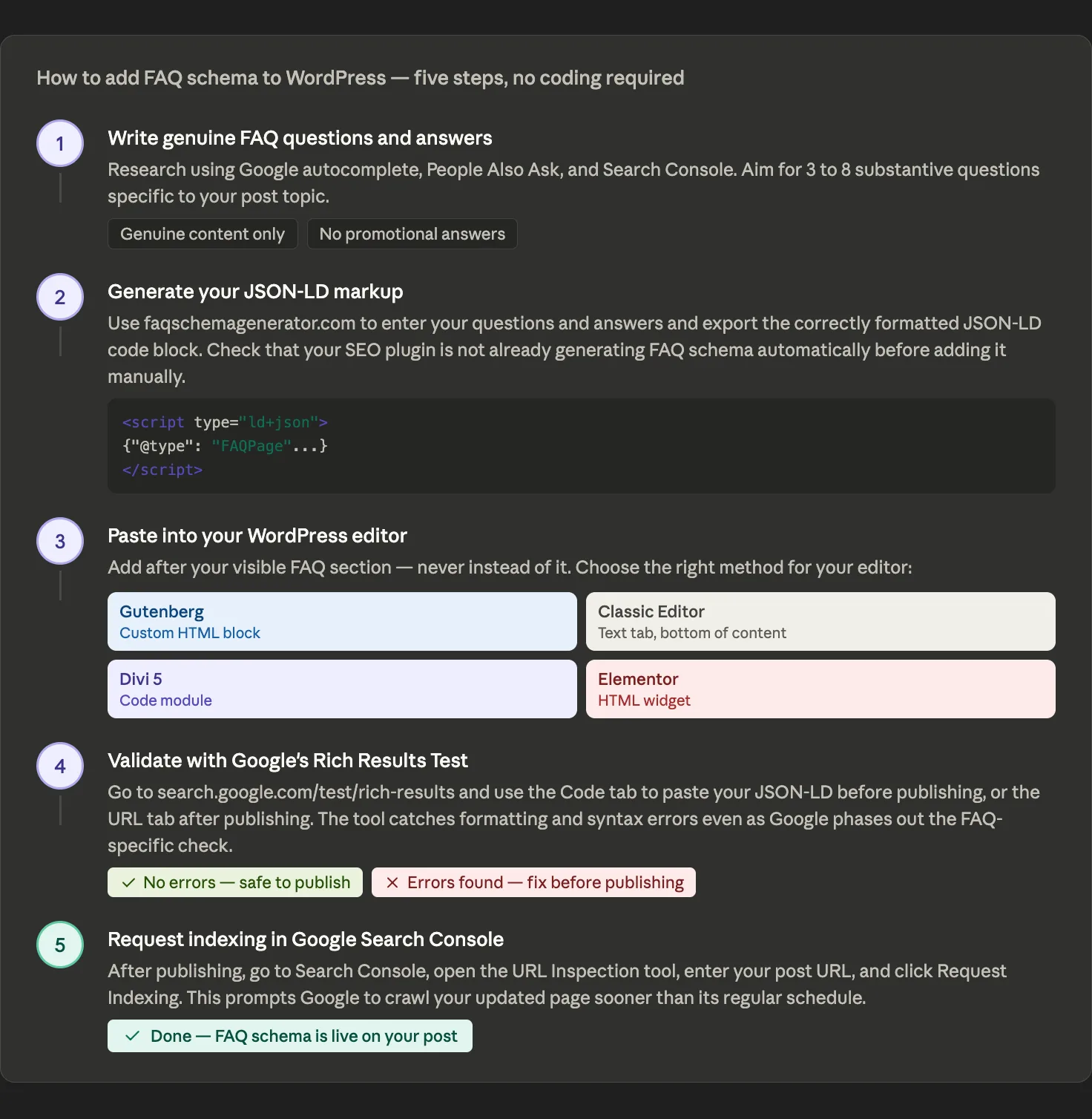
The implementation process for FAQ schema is unchanged by the May 2026 deprecation. Here is the complete five-step process for adding valid JSON-LD markup to any WordPress post, across all four major editors.
Step 1: Write Genuine FAQ Questions and Answers
Start with the content itself. Your FAQ section should contain questions your readers are actually asking, written to genuinely help them. This matters more now than before the deprecation. The thin, artificial FAQ sections that were added solely to trigger rich results are exactly what Google's 2023 restrictions and 2026 deprecation were intended to address.
Aim for three to eight questions per post. Each answer should be substantive, with a few sentences at a minimum. Write questions the way a real reader would ask them.
Step 2: Generate Your FAQ Schema Code
With your questions and answers ready, open an FAQ schema generator. A good generator lets you enter your questions and answers directly or import them from a formatted text file for bulk processing. Enter each question and answer, then export the JSON-LD block.
The exported code will look something like this:
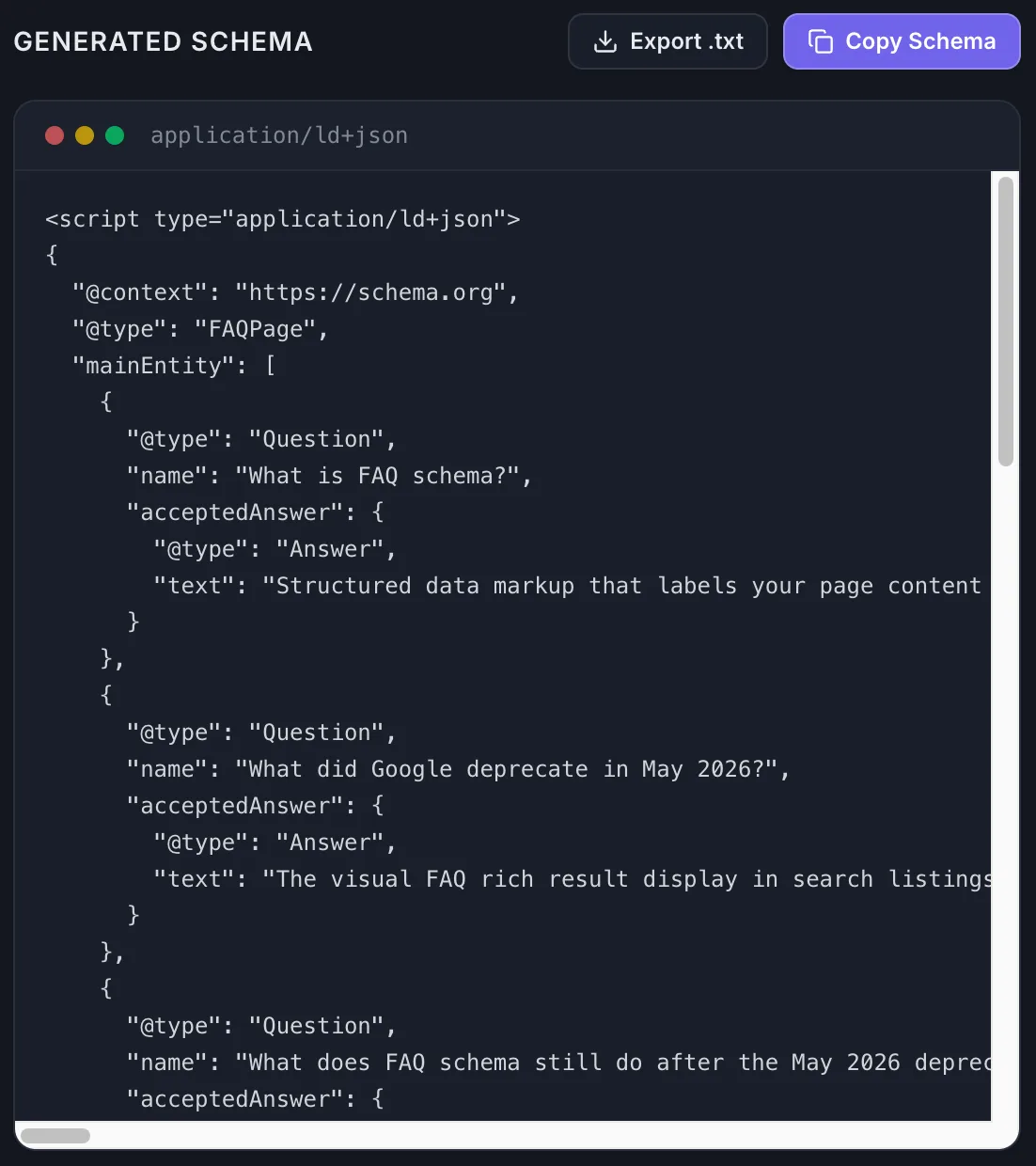
Copy the entire block, including the opening and closing script tags.
Before adding a manual FAQ schema, check whether your SEO plugin or page builder is already generating it automatically. Yoast SEO and Rank Math both inject FAQ schema in certain configurations. Adding a second block of FAQ schema to the same page creates duplicate markup and should be avoided.
Generate your FAQ schema code for free at faqschemagenerator.com. Enter your questions and answers, export the correctly formatted JSON-LD, and it's ready to paste into your post in minutes.
Step 3: Add the Schema Code to Your WordPress Post
How you paste the code depends on which editor you use.
Gutenberg Block Editor: Scroll to the bottom of your post, after your visible FAQ section. Click + to add a new block, search for Custom HTML, and paste your JSON-LD into it. The block shows raw code in the editor but renders invisibly on the published page.
Classic Editor: Switch from the Visual tab to the Text tab. Scroll to the bottom of the content and paste the JSON-LD there. Switch back to Visual when done.
Divi 5: Add a Code module after your visible FAQ section. Paste the JSON-LD directly into the module editor. Divi can occasionally alter characters when saving, so always validate after publishing.
Elementor: Add an HTML widget after your visible FAQ section. Paste the JSON-LD into the widget's code field and click Update. The same validation advice applies.
In all editors, make sure the JSON-LD block is added in addition to your visible FAQ section, not instead of it. Google requires that the questions and answers in your schema markup match the content visible to users on the page.
Step 4: Validate Your Schema
Before publishing, run the code through Google's Rich Results Test at search.google.com/test/rich-results. Use the Code tab to paste your JSON-LD directly. As Google phases out support for FAQ rich results, the tool may no longer report FAQ eligibility specifically, but it still identifies JSON-LD formatting and syntax errors that prevent search engines from reading your markup correctly.
Common errors include missing commas, unmatched brackets, and special characters that need to be escaped. A dedicated FAQ schema generator handles most of this automatically, but a validation check before publishing is always worth the two minutes it takes.
Step 5: Publish and Request Indexing
After publishing, go to Google Search Console, open the URL Inspection tool, enter your post's URL, and click Request Indexing. This prompts Google to crawl your updated page sooner than its regular schedule.
For a full walkthrough of each editor and the complete validation process, see: How to Add FAQ Schema to WordPress Without a Plugin
Part 5: How to Write FAQ Questions That Actually Work
This is the section most FAQ schema guides skip. They cover the technical implementation in detail and say almost nothing about the content quality that determines whether your FAQ schema actually serves readers and search engines. That gap matters more in 2026 than it ever did when rich results were the primary motivator.
Start With What Your Readers Are Actually Asking
The most common FAQ schema mistake is writing questions from the inside out. You know your topic well, so you write questions that cover what you think is important rather than what readers are actually searching for.
The fix is to research your questions the same way you'd research any keyword. Three practical methods:
Google autocomplete: Type your topic into Google and note what the autocomplete suggestions show. These are real searches real people are making. If you're writing a post about FAQ schema, autocomplete phrases like "does FAQ schema still work," "how to add FAQ schema WordPress," and "FAQ schema deprecated" tell you exactly what questions belong in your FAQ section.
People Also Ask boxes: Search for your main topic and look at the expandable questions in the People Also Ask section of the results page. These are the questions Google has identified as highly relevant to searchers on your topic. Using these as the basis for your FAQ questions creates a natural alignment between your content and what Google's systems already associate with the topic.
Google Search Console: If your post is already published, the Performance report shows you the actual queries people used to find your page. Any question-format queries in that list are strong candidates for explicit FAQ questions in your content.
What Makes a Good FAQ Answer
A good FAQ answer does three things. It directly answers the question asked without preamble. It provides enough detail to be genuinely useful, typically two to five sentences. And it uses clear, specific language rather than vague claims or promotional copy.
Google's guidelines for FAQ markup, which remain in place even after the rich results deprecation, require that answers not be primarily promotional, that they directly address the question, and that they appear as visible content on the page. These aren't just compliance requirements. They describe what makes FAQ content genuinely useful to readers, which is the standard worth holding regardless of what structured data markup does or doesn't do in search.
How Many Questions to Include
Three to eight questions per post is the practical range that works well. Fewer than three, and the FAQ section feels thin. More than eight, and the questions tend to drift from being genuinely relevant to the specific post toward being generic category content.
Quality matters more than quantity. A post with four specific, substantive questions and thorough answers serves readers better than a post with ten shallow questions written to add word count.
Avoid These FAQ Content Patterns
Questions that answer themselves in the question. "Is FAQ schema a type of structured data markup that labels your content for search engines?" is not a question a reader would ever ask.
Questions that duplicate your article's headings. If your post already covers "What is FAQ schema?" thoroughly in the body, adding it as a FAQ question too creates redundancy without adding value.
Promotional questions. "Why is faqschemagenerator.com the best FAQ schema tool?" is not a question a reader would search for. Google's guidelines specifically flag promotional answers as disqualifying.
Questions loosely related to the page topic. Each FAQ question should relate directly and specifically to the content of that post, not to the general topic area.
The standard for FAQ content in 2026 is simply genuine usefulness. If the questions and answers are valuable to a reader who found your post through a search, the FAQ section is doing its job. If they exist primarily to add markup to the page, they aren't.
Part 6: Common FAQ Schema Mistakes and How to Fix Them
Even well-intentioned FAQ schema implementations frequently contain errors that prevent the markup from working correctly. These are the seven most common mistakes, updated for the post-deprecation context.
Mistake 1: Adding Schema Without Visible FAQs on the Page
The FAQ schema markup must match the content that is actually visible to your readers. If your JSON-LD describes questions and answers that do not appear in the page's readable content, Google considers it deceptive markup. This applies whether the FAQ section is missing entirely, hidden behind a login wall, or rendered by JavaScript in a way Google cannot read.
The fix: Before publishing, confirm that every question and answer in your JSON-LD block appears in the visible content of your page. The schema describes the content. It does not replace it.
Mistake 2: Running Two FAQ Schema Methods at the Same Time
If you use an SEO plugin like Yoast or Rank Math that generates FAQ schema automatically, and you also manually add a JSON-LD block to the same post, Google finds two FAQ schema blocks on one page. This creates conflicting signals and typically results in neither block being recognized correctly.
The fix: Choose one method and use it consistently. If your SEO plugin handles FAQ schema, let it do the work. If you prefer manual JSON-LD, check that your plugin is not also generating it for the same post.
Mistake 3: Writing Thin or Promotional Answers
Google's FAQ markup guidelines require that answers not be primarily promotional and directly address the question asked. Answers that exist to sell something, that are vague, or that do not genuinely respond to the question are poor candidates for schema markup.
The fix: Each answer should stand alone as a useful, complete response. A few substantive sentences is the minimum. Ask yourself whether a reader who saw only this question and answer would find it genuinely helpful.
Mistake 4: Using Identical FAQs Across Multiple Pages
Copying the same FAQ block to multiple pages tells Google either that the schema is boilerplate and not meaningful or that your site has duplicate content issues. Neither outcome is helpful.
The fix: Write unique FAQ questions for each post that specifically address the content of that post. Each FAQ section should feel like it belongs to that page and no other.
Mistake 5: Invalid JSON-LD Formatting
A single misplaced comma, an unmatched bracket, or an unescaped quotation mark inside an answer can break your JSON-LD entirely. Google's crawler reads structured data code strictly, and a formatting error means the entire schema block is ignored.
The fix: Never publish FAQ schema without running it through Google's Rich Results Test first. A dedicated FAQ schema generator eliminates most formatting errors by generating JSON-LD from plain-text inputs, but a validation check before publishing catches any remaining issues.
Mistake 6: Never Updating Schema When You Update the Post
Most bloggers add FAQ schema and then forget about it. If you update your FAQ answers, add new questions, or significantly change your post's content, your schema markup becomes out of sync with what is actually on the page. Mismatched schema and visible content are quality issues worth addressing.
The fix: Treat your FAQ schema as part of your post content, not a one-time addition. When you update your post's FAQ section, regenerate the schema markup to reflect the changes.
Mistake 7: Keyword-Stuffing FAQ Questions
Questions loaded with target keywords are unnatural and unlikely to reflect what real readers are asking. Worse, they make your FAQ section feel like spam to readers who see it on the page.
The fix: Write questions the way a real reader would ask them. Short, natural, conversational questions serve readers better and align more closely with the question-format queries that appear in Google search.
For a full treatment of each mistake with detailed fixes, see: 7 FAQ Schema Mistakes WordPress Bloggers Make (And How to Fix Them)
Part 7: FAQ Schema and AI Search: An Honest Assessment
The May 2026 deprecation coincided with a significant expansion of AI-powered search features. Google's I/O conference in May 2026 announced what it described as a new era for AI Search, including AI Mode, follow-up questions from AI Overviews, and Search agents. This timing has led many SEO practitioners to position FAQ schema as newly relevant for AI search visibility.
The honest assessment is more nuanced than either the optimistic or dismissive takes suggest.
What We Know
Google has indicated that structured data can help it understand page content, and this applies to AI-powered features as well as traditional search since both rely on Google's broader content understanding layer. FAQPage markup remains a valid Schema.org type and continues to be crawlable by Google's systems.
Beyond Google, FAQPage structured data is crawlable by Bingbot, PerplexityBot, and the various retrieval-augmented generation crawlers that index the open web for AI-powered tools. These systems use structured data as one of many signals when parsing and indexing content, though how much weight any specific schema type carries in source selection is not publicly documented.
What We Do Not Know
Google has not documented FAQPage schema as a direct ranking or citation factor for AI Overviews. Some SEO testing suggests that well-implemented schema may be associated with higher AI Overview appearance rates, but Google has not confirmed a causal relationship. The connection between FAQ schema specifically and AI search visibility is plausible but not proven.
The Practical Implication
The argument for FAQ schema as an AI search signal only holds when the underlying content genuinely works as questions and answers. AI systems, like Google's traditional ranking systems, are designed to serve users well-structured, genuinely useful content. FAQ sections written to game a technical signal rather than to help readers are unlikely to deliver AI search benefits regardless of how the JSON-LD is formatted.
The most defensible reason to add FAQ schema in 2026 is the one that has always been true: it helps search engines understand your content structure. The AI search angle adds a plausible secondary benefit. Neither benefit requires any change to the approach described in Parts 4 and 5 of this guide. Write genuine FAQ content. Format the markup correctly. Keep it in sync with your visible content.
Part 8: Should You Keep, Remove, or Add FAQ Schema?
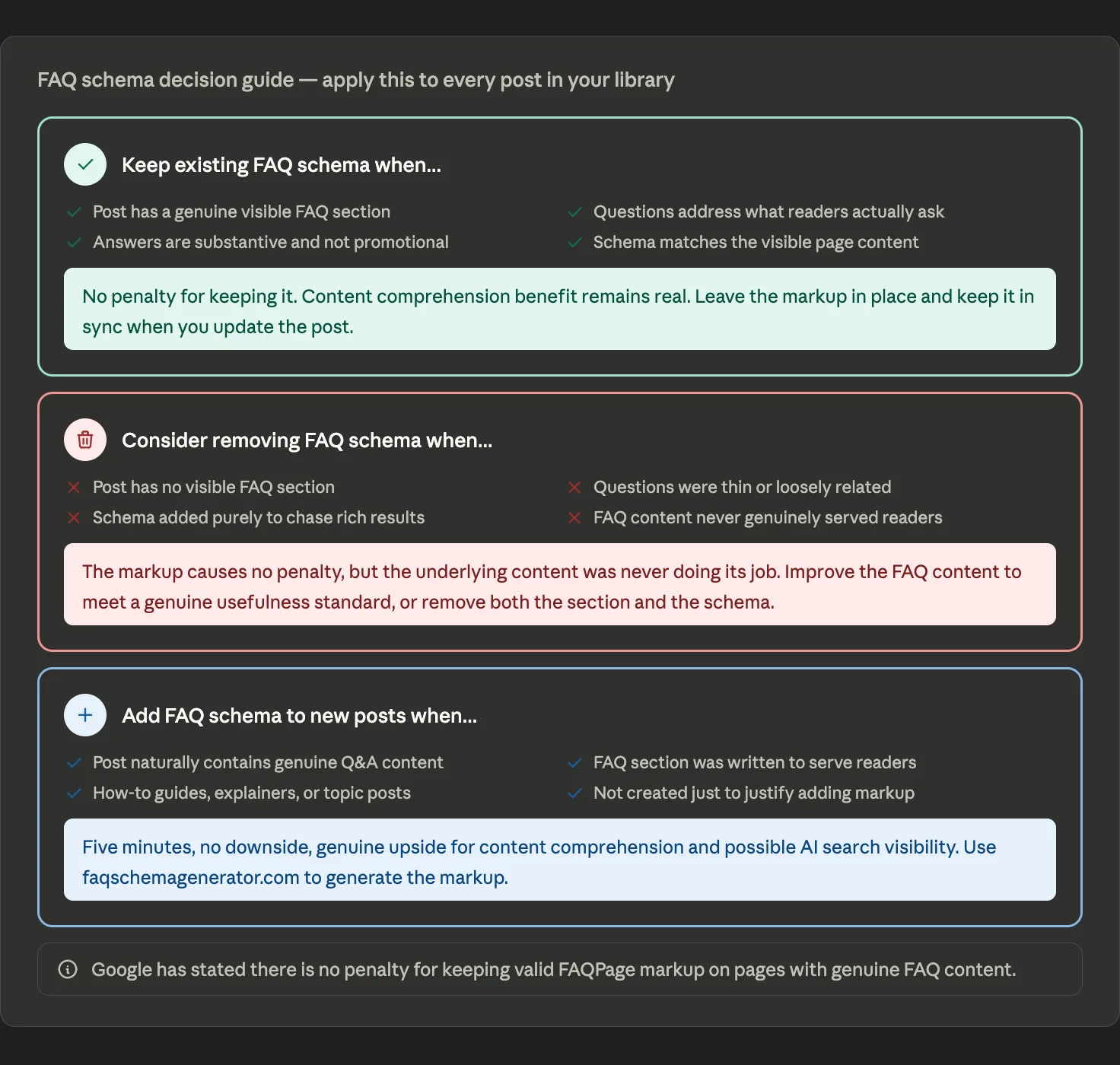
This is the practical question every WordPress blogger is asking in the wake of the May 2026 deprecation. The answer is different for each of the three scenarios.
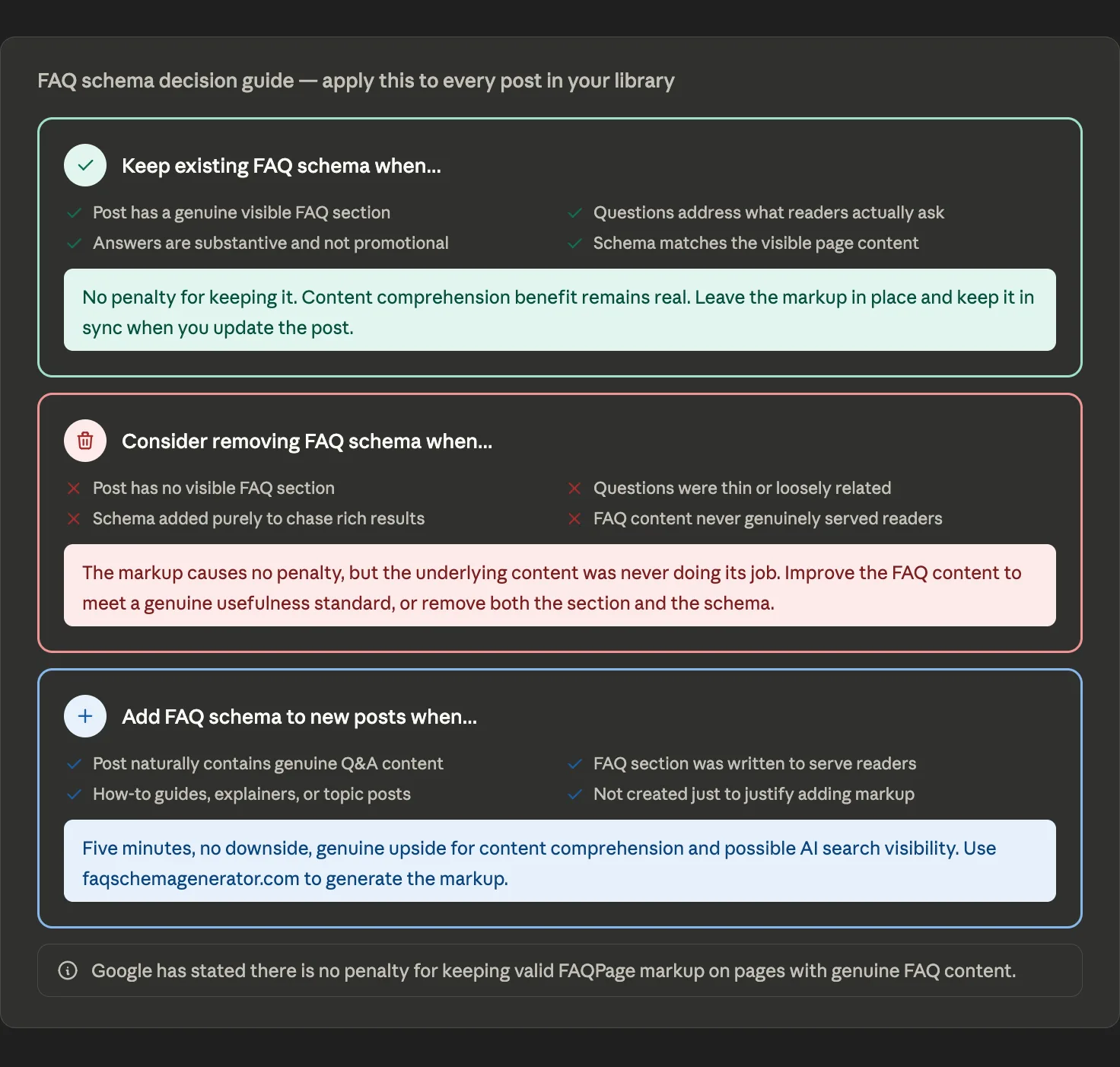
Existing Posts With Genuine FAQ Content: Keep the Schema
If your posts have substantive FAQ sections that genuinely serve readers, keep the markup in place. Google has stated there is no penalty for keeping valid FAQPage markup on pages with genuine FAQ content, and the content comprehension benefit remains real. Removing it costs you something. Keeping it costs you nothing.
Maintain the schema the same way you maintain the rest of your content. When you update your FAQ answers, regenerate the JSON-LD to keep the markup in sync. When you add new questions, add them to both the visible section and the schema block.
Existing Posts With Thin or Artificial FAQs: Clean Up
If you added FAQ sections specifically to trigger rich results — with thin questions, loosely related topics, or promotional answers — these posts are worth revisiting. Not because the schema markup itself causes harm, but because the underlying content was never genuinely useful to readers, and that is worth fixing regardless of what the markup does in search.
The right approach for these posts is to either improve the FAQ content to meet a genuine usefulness standard or remove both the FAQ section and the schema markup.
New Posts Going Forward: Add When Content Warrants It
The standard for adding FAQ schema to new posts is simpler than it was before the deprecation. If your post naturally contains genuine questions and answers that readers are searching for, adding FAQ schema takes five minutes and carries no downside. The content comprehension benefit is real, the AI search connection is plausible, and the markup costs nothing to implement.
If your post does not have a genuine FAQ section, do not create one just to add markup. An FAQ section helps readers who arrive at your post with specific questions. If that describes your content, add the section and add the schema. If it does not, move on.
For a detailed decision framework with specific criteria for each scenario, see: Does FAQ Schema Still Work in 2026?
Part 9: FAQ Schema and Other Structured Data Types
FAQ schema is one type within a broader structured data practice that remains fully active and valuable in 2026. Understanding where it sits within that landscape helps calibrate how much effort to invest in it relative to other schema types.
Google has retired several structured data types between 2023 and 2026 as part of an ongoing effort to focus on features that deliver genuine user value. The FAQ deprecation is part of this pattern, not an isolated event. The markup specification for each deprecated type stays valid. The visible search enhancement that depended on it does not.
The structured data types that continue to produce active rich results and are worth prioritizing for most WordPress bloggers:
Recipe schema enables rich recipe cards displaying cook time, ingredient counts, star ratings, and calorie information. For food bloggers, this is the highest-priority structured data implementation available.
Review and Rating schema displays star ratings in search results for product or service reviews. It is one of the most click-generating enhancements available, though Google applies stricter guidelines than it did in the past, particularly for self-authored reviews.
Product schema communicates price, availability, and review data for e-commerce and product pages. Essential for any site selling or reviewing physical or digital products.
Event schema displays event dates, locations, and ticket information. Drives high-intent clicks from users actively planning to attend.
Article schema helps Google understand your content as editorial. It communicates headline, author, and publication date. Many WordPress themes and SEO plugins add this automatically.
The practical takeaway is that structured data is worth investing in. Individual types evolve, and the FAQ deprecation serves as a reminder that rich results features are not permanent. But accurately labeling your content for machine reading is as relevant in the AI search era as it has ever been.
For a full introduction to structured data and which types matter most for WordPress bloggers, see: What Is Structured Data and Why Does Every WordPress Blogger Need It?
Conclusion
FAQ schema in 2026 is not what it was in 2022. The rich result display that made it a popular SEO tactic is gone. What remains is a valid structured data type that helps search engines understand your content, may indirectly support visibility in AI-powered search features, and costs almost nothing to implement correctly.
The biggest shift the deprecation requires is not technical. It is a change in motivation. Adding FAQ schema to a post because the questions and answers genuinely help your readers is worth doing. FAQ schema added solely to gain a SERP visual enhancement that no longer exists is not. The markup itself is neutral. The quality of the content behind it is what matters.
For WordPress bloggers who have been using FAQ schema: keep the markup on posts where the FAQ content is genuine and useful. Clean up posts where the FAQ sections were thin or artificial. Add it to new posts when the content warrants it. That is the entire practical guidance distilled to three sentences.
For WordPress bloggers who have not yet used FAQ schema, the case is different from what it was a year ago, but there is still a reasonable argument for implementing it on posts with genuine Q&A content. The five-step process in Part 4 of this guide takes about five minutes per post and requires no coding or plugins.
Structured data remains one of the more durable technical SEO practices available. Rich result features come and go. The practice of accurately labeling your content for machine reading becomes increasingly relevant as AI search systems play a larger role in how people find information online. FAQ schema is one tool within that practice. Use it when your content warrants it, and do not when it does not.
Generate valid FAQ schema for your WordPress posts in minutes at faqschemagenerator.com. Enter your questions and answers, export the correctly formatted JSON-LD, and paste it into your post. No coding or plugins required.
Frequently Asked Questions
What is FAQ schema?
Structured data markup that labels your page content as questions and answers in a format search engines and AI systems can read directly. FAQPage remains a valid Schema.org type even after Google's May 2026 deprecation of FAQ rich results.
What did Google deprecate in May 2026?
The visual FAQ rich result display in search listings — the expandable question-and-answer dropdowns that appeared beneath individual search results. Google did not deprecate the FAQPage structured data type itself. There is no instruction from Google to remove valid FAQPage markup from pages with genuine FAQ content.
What does FAQ schema still do after the May 2026 deprecation?
FAQ schema continues to help search engines understand your content structure, which affects how well your pages match question-based search queries. It may indirectly support visibility in AI-powered search tools like Google AI Overviews, Bing Copilot, and Perplexity, though Google has not confirmed FAQPage as a direct AI Overview ranking or citation factor. The markup remains crawlable by Bing, Perplexity, and other AI systems, and genuine FAQ content may also contribute to appearances in Google's People Also Ask boxes.
How do you add FAQ schema to a WordPress post?
There are five steps. First, write genuine FAQ questions and answers that serve your readers. Second, generate the JSON-LD markup using a schema generator tool like faqschemagenerator.com. Third, paste the code into your WordPress editor — use a Custom HTML block in Gutenberg, the Text tab in Classic Editor, a Code module in Divi 5, or an HTML widget in Elementor. Fourth, validate the markup using Google's Rich Results Test to catch any formatting errors. Fifth, request indexing in Google Search Console after publishing so Google crawls your updated page promptly.
What makes a good FAQ question for schema markup?
Good FAQ questions are ones your readers are genuinely searching for, researched using Google autocomplete, People Also Ask boxes, and your Search Console query data. Each answer should be substantive — two to five sentences at minimum — with no promotional language. Questions should be specific to the content of the post rather than generic, and the FAQ section should contain three to eight questions. Avoid keyword stuffing in questions and avoid duplicating FAQ content across multiple posts.
What are the most common FAQ schema mistakes?
The seven most common mistakes are: adding schema without a visible FAQ section on the page, creating duplicate schema by combining manual JSON-LD with an SEO plugin that also generates FAQ schema automatically, writing thin or promotional answers, using identical FAQ questions across multiple pages, invalid JSON-LD formatting caused by missing commas or unmatched brackets, failing to update the schema markup when the post content changes, and keyword-stuffing FAQ questions rather than writing them naturally.
Does FAQ schema help with Google AI Overviews and AI search?
Plausibly, but this has not been confirmed by Google. The content comprehension benefit is documented — Google has indicated structured data can help it understand page content, and AI Overviews and Gemini-powered features rely on Google's broader content understanding layer. However, Google has not documented FAQPage schema as a direct AI Overview ranking or citation factor. Some SEO practitioners believe well-structured FAQ content may indirectly help AI systems interpret pages more clearly, but this remains a plausible rather than confirmed benefit.
Should you keep, remove, or add FAQ schema after the May 2026 deprecation?
The answer depends on the situation. Keep existing FAQ schema on posts where the FAQ content is substantive, genuinely useful to readers, and accurately matched by the schema markup — there is no penalty for keeping it and the content comprehension benefit remains. Consider removing or improving schema on posts where FAQ sections were thin, loosely related to the topic, or created purely to trigger rich results that no longer exist. Add FAQ schema to new posts when the post naturally contains genuine questions and answers that readers are searching for, the FAQ section was written to serve readers rather than to justify adding markup, and the content type suits FAQ treatment such as how-to guides, topic explainers, and informational articles.
What other structured data types still support Google search enhancements in 2026?
Several structured data types continue to produce active rich results in Google search. Recipe schema enables rich recipe cards with cook time, ingredient counts, star ratings, and calorie information. Review and Rating schema displays star ratings in search results for product and service reviews, though Google applies stricter guidelines than in the past particularly for self-authored reviews. Product schema communicates price, availability, and review data for e-commerce and product pages. Event schema displays dates, locations, and ticket information for events. Article schema helps Google understand your content as editorial and communicates headline, author, and publication date. Google has retired several structured data types between 2023 and 2026, so the FAQ deprecation is part of a broader pattern rather than an isolated event.